In today’s fast-paced work environment, professionals and teams often find themselves inundated with messages in Slack while simultaneously juggling their task lists in separate applications. This constant context-switching not only disrupts focus but can also result in important action items getting lost amidst the flurry of conversations. Recognizing this challenge, TodoTicked is excited to announce its new integration with Slack, allowing users to manage tasks directly within their conversations.
Streamlined Workflow with TodoTicked and Slack Integration
Imagine being in a crucial team meeting where a decision is made, and someone suggests a follow-up task. Traditionally, you would have to break away from the conversation to switch to a different app, create the task, and then return to Slack. With the TodoTicked Slack integration, this interruption is a thing of the past.
Slash Commands for Efficiency
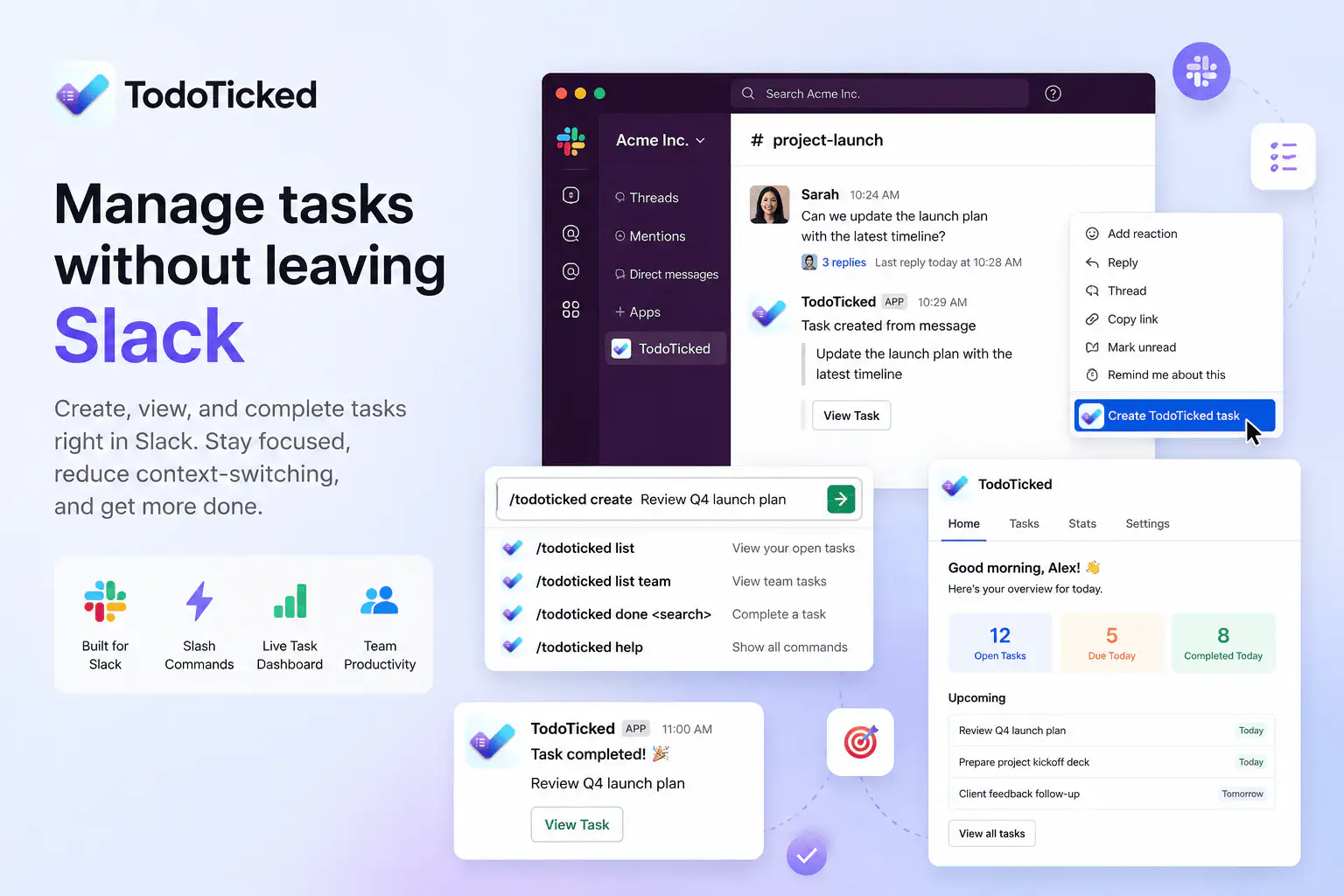
With TodoTicked’s integration, you can leverage slash commands to create, view, complete, and manage tasks without ever leaving Slack. Here are some of the available commands:
/todoticked: Opens the task creation form./todoticked create <title>: Quickly create a task directly from the conversation./todoticked list: View your open tasks at a glance./todoticked list team: Access team tasks to stay abreast of collaborative efforts./todoticked done <search>: Find and complete a task by its title./todoticked connect: Link your TodoTicked account to Slack./todoticked disconnect: Unlink your account when needed./todoticked help: Display the available commands.
These commands allow you to manage your tasks efficiently, ensuring that you can focus on your work without unnecessary distractions.
Message-to-Task Conversion
One of the most powerful features of this integration is the ability to convert a Slack message into a TodoTicked task. When you come across a message that requires action, simply open the message's shortcuts menu and transform it into a task using its content as the task title. This seamless transition ensures that nothing falls through the cracks when switching between tasks and conversations.
For example, if a colleague shares a customer request in a Slack channel, you can quickly convert that message into a task. This feature not only saves time but also ensures that important tasks are captured and tracked efficiently.
App Home Dashboard
The TodoTicked Slack integration includes an App Home dashboard that displays today’s tasks, upcoming work, open-task totals, and tasks completed today, all without the need to open a browser. This dashboard serves as a quick reference for your current workload, helping you prioritize effectively without losing focus on ongoing discussions.
The dashboard is designed to be user-friendly, providing a snapshot of your productivity at any given moment. You can easily see what needs to be done today and what is coming up in the near future, allowing for better time management and planning.
Interactive Buttons for Task Management
Completing tasks is made even easier with interactive buttons that allow users to mark tasks as done directly from Slack notifications and the App Home dashboard. This feature streamlines the workflow, enabling you to maintain momentum and keep your productivity high.
For instance, if you receive a notification about a task that has been completed, you can simply click the button to mark it as done without navigating away from your conversation. This functionality is especially useful during busy workdays when every second counts.
Channel Notifications for Team Awareness
For teams collaborating in Slack, the integration offers optional channel notifications for newly created tasks. This feature keeps everyone in the loop, reducing the chances of miscommunication and ensuring that important tasks are visible to all relevant stakeholders.
By enabling channel notifications, team members can stay updated on new tasks as they are created, fostering a culture of transparency and collaboration. This is particularly beneficial for teams working on projects with tight deadlines, where staying informed is crucial for success.
A Practical TodoTicked Workflow
To get started with managing tasks in Slack using TodoTicked, follow these straightforward steps:
Go to TodoTicked’s Settings → Integrations page and select “Add to Slack.”
Authorize TodoTicked in the appropriate Slack workspace.
Run
/todoticked connectin Slack to link your TodoTicked account.Start managing tasks with
/todoticked.
Real-World Examples
Let’s consider practical scenarios to illustrate how this integration can enhance productivity:
Converting a Customer Request: During a customer support conversation, a team member mentions a feature request. You can quickly turn this message into a task by using the message-to-task conversion feature, ensuring it gets addressed without delay.
Reviewing Today’s Workload: At the start of each day, you can check your App Home dashboard to see what tasks are on your plate and prioritize accordingly. This proactive approach helps you manage your time effectively and ensures that you’re focused on high-priority tasks.
Completing Action Items: While discussing project updates in a meeting, you can complete tasks in real-time using the interactive buttons in Slack notifications, keeping everyone informed about progress. This not only enhances accountability but also boosts team morale as everyone can see tasks being completed.
Viewing Team Assigned Work: Use the command
/todoticked list teamto quickly view all tasks assigned to your team, fostering better collaboration and awareness of collective responsibilities. This visibility helps team members understand their roles and contributions to the project.
Fair Comparison: TodoTicked vs. Basic Task Management
While many task management tools offer basic task creation functionality, TodoTicked elevates the user experience with its comprehensive features. The App Home dashboard provides live statistics on tasks, while the interactive completion buttons enable quick updates without the need to switch between apps. Team-scoped task visibility ensures that everyone is aligned on project goals, making TodoTicked a robust solution for teams looking to streamline their workflow within Slack.
In contrast to basic task management tools, TodoTicked offers a holistic approach to productivity. The combination of real-time updates, seamless integration, and user-friendly commands makes it a standout choice for professionals who rely on Slack for communication and collaboration.
Frequently Asked Questions
How do I get started with the TodoTicked Slack integration?
Simply follow the setup steps outlined in the practical workflow section above to link your account and start managing tasks in Slack.
Is this integration available for all TodoTicked users?
The Slack integration is available for TodoTicked Pro and Team plans. Free-plan users can upgrade to Pro to unlock this functionality along with other integrations.
Can I manage my tasks from mobile Slack?
Yes, the integration works seamlessly on both desktop and mobile versions of Slack, allowing you to manage tasks wherever you are.
What if I encounter issues while using the integration?
If you experience any issues, you can reach out to TodoTicked’s support team for assistance. They are available to help troubleshoot any problems you may encounter.
Conclusion
TodoTicked’s Slack integration represents a significant step forward for professionals looking to enhance their productivity. By allowing you to manage tasks directly within Slack, it minimizes context-switching and keeps you focused on what matters most. To start using this integration, connect your Slack account from TodoTicked’s Settings page today. If you’re on the Free plan, consider upgrading to Pro to unlock this integration and other powerful tools designed to streamline your workflow.
Takeaway: Manage your tasks efficiently without leaving your Slack conversations. Harness the power of TodoTicked’s Slack integration and transform the way you work.